How to Use Binance Futures TWAP: Splitting a Large Order, Checking Margin, and What Ends the Strategy

Fire a large futures order off at market in one go and it eats its way down the order book: clear one price level, move on to the next, and it may punch through several levels of resting orders before it's fully filled. TWAP on Binance Futures takes a different route. It cuts that order into smaller pieces and executes them in batches over a period you choose. The Help Center files it under trading bots, among its futures algo orders.
What problem TWAP solves
The Binance Help Center's explainer on what the TWAP strategy is and how it works (checked September 2026) defines it this way: TWAP is an algorithmic execution strategy that aims to bring your average execution price close to the time-weighted average price over the period you specify. It's typically used to keep a large order's impact on the market as small as possible, by breaking the order into smaller quantities executed at regular time intervals.
The page lists two situations where it may get you a better execution price:
- Your order size is larger than the liquidity available on the order book. Filling it in one shot means eating through several price levels, each fill worse than the last; split into batches, each piece only faces the book as it stands at that moment. Whether the book refills, and at what prices, depends on the market, and TWAP doesn't guarantee execution either.
- The market is highly volatile, and you don't expect a clear move up or down.
Now flip it around. If the order is small enough for the book to absorb and the market is trending one way, neither situation applies. If you want to be filled right away, just place the order; TWAP doesn't promise a better price.
Where to set it up and what to enter
- On Binance Futures on the web (the help page is written for the web version, so the steps below follow the web interface), open the order-type dropdown and choose TWAP.
- A pop-up lets you read the TWAP trading guide, and the page recommends going through it carefully before your first order.
- Pick the contract, enter the direction (buy or sell), the size and the duration, then click Buy/Long or Sell/Short.
- Check the order details and click Confirm.
Two parameters come with hard limits:
| Parameter | What it means | Limit |
|---|---|---|
| Size | The total quantity you want to buy or sell this time; the strategy tries to fill up to this size | Minimum notional value equivalent to USD 1,000 |
| Duration | How long execution runs in total | Minimum 5 minutes, maximum 24 hours |
Direction and size are settled before you place the order, so the call you actually have to make is the duration. The shorter it is, the bigger each child order, and the closer you get to swallowing the whole order at once. The longer it runs, the smaller each piece, but the more time passes, the further the market can move, and the further your final average fill may land from the price you saw when you started. Where to strike the balance depends on how big the order is relative to the book: compare the total quantity with what's resting in the first few price levels. If those levels can't come close to absorbing it, stretch the duration out. If they can already take it, go shorter, or simply place the order directly.
Margin checks: when the whole strategy gets terminated
This is the rule that decides whether the strategy stops partway through. The page is explicit: make sure your futures wallet holds enough margin balance, because if any single TWAP order fails the margin requirement, the entire TWAP strategy is terminated. The checks work like this:
- Reduce-only orders skip the margin check.
- Every other order is checked with Order Cost = (Total Order Size × Last Price) / Leverage, and it passes only if Order Cost < Available for Order. Available for Order is the margin you can use to open positions.
Say the total order size is 0.1 BTC, the last price is 60,000 USDT and leverage is 10x. Order Cost = 0.1 × 60,000 / 10 = 600 USDT. If your Available for Order is only 500 USDT, the check fails and the strategy is terminated. The formula uses the last price, so when the price rises, the same size works out to a higher cost.
After you place it: tracking progress, stopping it, checking history
- Track progress: under Running in the strategy overview panel, the TWAP view shows the average fill price, strategy duration, strategy status and total size. The Filled% column shows how much of the amount has been executed so far.
- Stop it manually: click End in the Action column.
- See all past orders: open the History tab in the strategy overview panel.
Six rules that are easy to miss
The notes at the very end of the page include several points that directly affect whether you end up using it wrong:
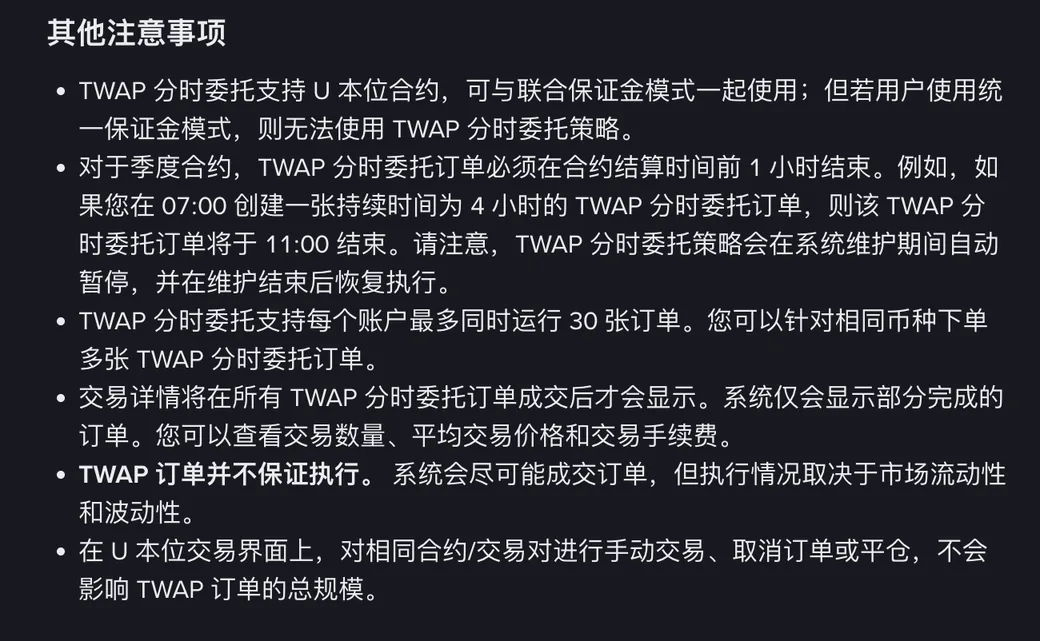
- Supported products and modes: it works on USDⓈ-M Futures, including with Multi-Assets Mode; accounts using Portfolio Margin can't use it.
- Quarterly contracts: a TWAP order has to finish 1 hour before the contract's settlement time. The page's example is an order created at 07:00 with a 4-hour duration, which ends at 11:00; it shows how the end time is worked out, so check the contract's settlement time yourself before you set the duration.
- System maintenance: execution pauses automatically during maintenance and resumes once it's over.
- Order cap: each account can have up to 30 TWAP orders running at once, and several of them can be on the same coin.
- When the details show up: trade details appear only after all TWAP orders are filled, and they cover the traded quantity, average trade price and trading fees. Right after that, the page adds that the system only displays partially completed orders, without making clear how much detail you can actually see while an order isn't fully filled.
- No guaranteed execution: the system fills as much as it can, but execution depends on market liquidity and volatility.
One more thing: on the USDⓈ-M trading interface, manually trading, cancelling orders or closing positions on the same contract doesn't change the TWAP order's total size. If you manually open a position in the same direction on the same contract while a TWAP is still running, the TWAP won't place any less because of it, and the two together will leave you with a bigger position than you planned. If you don't want it to carry on at its original size, click End in the Action column.
How it differs from grid and DCA bots
All three execute trades automatically, but they do different jobs:
| Tool | What it does | Related guide on this site |
|---|---|---|
| TWAP | Takes one order you've already decided to place and executes it in batches over 5 minutes to 24 hours; a full fill isn't guaranteed | This page |
| Grid | Repeatedly buys low and sells high within a price range you set | Binance Grid Trading: Spot Grid Rules and Settings |
| Recurring buys | Buys repeatedly on a fixed schedule | Binance Recurring Buys vs the Spot DCA Bot |
While a TWAP runs, check the Running tab now and then: a failed margin check ends it early, and thin liquidity can leave it only partly filled. A TWAP is run by Binance's own system rather than by a program you host through the API; if you also run your own bots, Trading Bot Not Placing Orders or Throwing Errors? covers what can go wrong on that side.