Getting a Binance Account Ready Before You Run a Bot
The articles on this site about grids, DCA bots, and reading AI market calls all assume you already have a working Binance account. And signing up isn't the same as being set up — anyone planning to run automated tools has a few more switches to flip at account-opening time than someone who just wants to buy some coins and sit on them, and setting them at sign-up is easier than going back for them once a tool needs them.
An automation user's account isn't a buy-and-hold account
If you're going to use automated tools, your account needs three extra things looked after — security, permissions, and fund separation. Not because the tools are dangerous, but because the way you use them is different.
The first difference is that you aren't there. Your grid is still resting orders and filling them while you sleep, so if someone does get into the account, you might not notice for a day. Someone trading by hand logs in for every action and is far more likely to walk into something odd; an account with a bot running loses that passive patrol and has to lean on the defences you set up in advance.
The second difference is a wider permission surface. Manual trading only ever uses order placement and withdrawal; connecting a third-party tool means creating an API key, keeping several strategies apart brings sub-accounts into it, and money has to move between spot, futures, and funding accounts. Every extra feature you use is another pair of switches to get right.
The third difference is how your money is structured. A bot can only touch the slice you allocate to it — provided you actually separated the money. Running a strategy with everything you own piled into one account is a risk that comes from the account setup, not from the strategy. So for each step below I'll also say how it relates to automation, rather than just telling you which button to press. If you'd rather see what tools Binance has and how they relate to each other first, skim The Full Guide to Binance AI & Smart Tools, then come back and open the account.
Put these within reach before you begin. If one is missing, the sign-up stops at the step that needs it:
- An email address or phone number you'll keep for the long haul. Pick a dedicated one, not the public inbox you type into every form and that's already buried in spam — account recovery and security alerts all come through here.
- The original ID document. National ID or passport; check that it hasn't expired, that all four corners are intact, and that the surface isn't scuffed or covered. Photocopies and photos of a screen basically never pass.
- An authenticator app, for two-factor authentication — much steadier than SMS codes. Install it on your phone; you'll want it the minute sign-up is done.
- A strong password you can actually remember, or a password manager. Don't reuse the set you already use on other sites; an exchange password deserves a line of its own.
- Confirmation that your region is served. Some countries and regions aren't served or are routed to a separate site, so go by what the sign-up page tells you when you open it. Don't force your way around this one — accounts that did tend to run into trouble later at verification or withdrawal.
One more thing that isn't an object but matters just as much: set aside a stretch of time you won't be interrupted. Getting cut off partway through the face check or a document upload means starting over, which is tedious, and repeated submissions can trip a risk review.
Where the referrer ID field is, and what to do if you missed it
The referral code goes in during the sign-up flow; new accounts that missed it can bind within 30 days if eligible (no deposit or trade yet, no existing referral relationship and so on, with the conditions on the Referral page). Entering it at sign-up is simplest, so don't rush this step. Sign-up runs roughly like this:
- Open the sign-up page. Open it through a link that carries the referral code and the referrer field is usually filled in for you, saving you typing.
- Enter your email or phone number and set a password. Don't get lazy and recycle one here.
- Check the referrer / referral code field. If the page has an optional referrer ID or referral code field (sometimes collapsed out of sight), expand it and check that it reads BN4111 before you submit. The field is optional, but it decides whether the fee discount applies later.
- Take the code and finish email or SMS verification.
- Log in and do identity verification first: a newly registered account can't deposit or place orders until it's verified, so no grid either. Once it's through, move on to the security settings and get the account's foundations right before you put money in.
Why an automation user should care more than most about that one field: a strategy like a grid earns a thin spread on frequent fills, and the fee is a structural, per-fill cost — the more fills, the bigger the absolute amount a discount saves. How Binance Grid Trading Fees Are Calculated takes that arithmetic apart in more detail; to put your own numbers in and see the gap, run them through the Fee Discount Calculator.
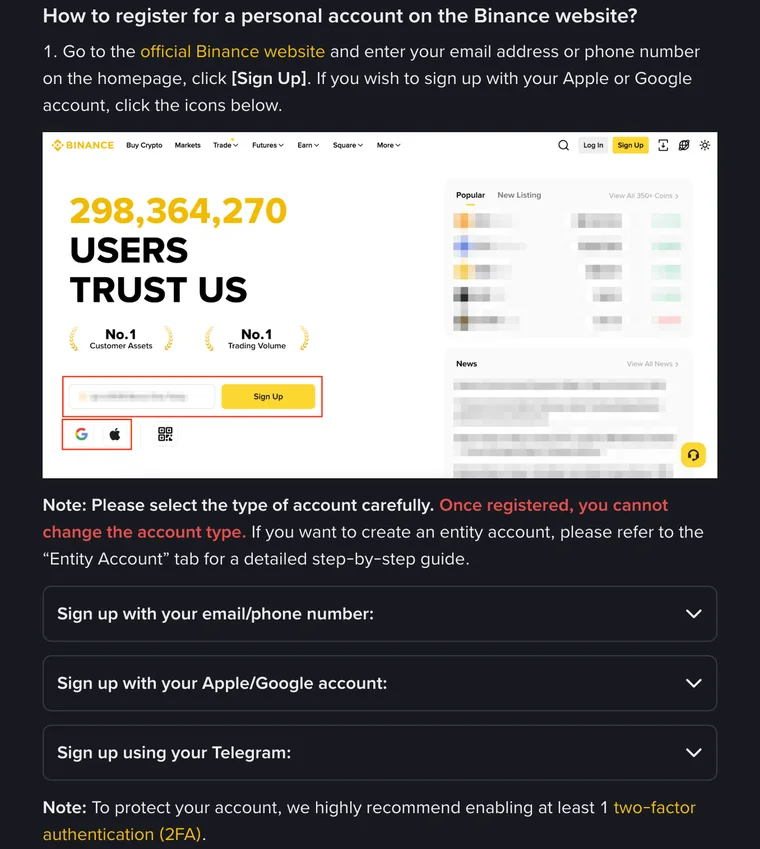
Open the Binance registration page. The site's invite code may provide up to 20% off trading fees; actual benefits depend on Binance's current promotion, and this site is an independent affiliate.
What Binance verification asks for and how to fix a rejection
Identity verification is the one part of opening an account that can drag on, because it has to pass a review; you track progress on the identity-verification page in your account, and if it stalls or gets sent back, that page states the reason and the next step. What you hand over is much the same everywhere: photos of the front and back of a document, one face liveness check, and in some cases proof of address. The name and date of birth you type have to match the document character for character — one character off is enough to get it sent back.
Rejections come in two groups, and running through them before you submit saves you a round of waiting.
One group is about the photo. Glare, shadow, or blur — move somewhere with even light, don't fire a flash straight at the document, and read the text back yourself afterwards to check it's legible; corners cut off or edges cropped — fit the whole document in frame with a little margin around it, don't shoot it flush against the edge; a photocopy or a photo of a screen — always shoot the original, because photographing a screen brings moiré and glare and the system throws it out easily. The other group is about what you typed. Copy the name, date of birth, and document number off the document rather than from memory; a document that has already expired won't pass however you shoot it, so renew it first. One separate word on the liveness step: take off hats, sunglasses, and masks, find somewhere well lit, and do the prompted movements a little slowly.
And one hard line: use only your own document. Open an account on someone else's ID and the name on the account won't match the money in it, which almost guarantees trouble later at risk control or withdrawal, and no support agent will be able to help you then. As for which tier you need to verify to and what limits and features each tier opens up, the rules differ by region and do get adjusted, so go by what your account page shows after you log in.
Protections to switch on before you connect a bot
Account created, verification passed — don't rush off to deposit and start a strategy. These four items and the API permissions in the next section sit on one thread; they answer the same question: who, under what conditions, can get coins out of this account. The first three close the two doors of login and withdrawal; the fourth sets the ceiling on your loss if a defence does fall. Ten minutes all in:
- Use an authenticator app for two-factor. SMS codes work, but they depend on your carrier, and SIM-swap and interception attacks aim at exactly that link. The rotating codes an authenticator app generates are never sent over the network, so they're clearly safer. Store the backup codes or recovery method at the same time, so you have a way back if the phone goes missing.
- Set an anti-phishing code. Treat it as a check digit between you and the platform: you pick a string, save it into your account, and every legitimate email Binance sends you afterwards carries it. With a bot running, most of what lands in your inbox is fill and risk alerts, so before you click any link, look for that string; if it isn't there, treat the message as fake. This one alone blocks a good share of fake support agents and fake notices.
- Turn on the withdrawal address whitelist. This is the only one of the four that keeps working while you're not there: once it's on, withdrawals are limited to the addresses you added in advance, and adding a new one usually goes through verification and a waiting period. With a bot sitting on orders day and night and you nowhere near the screen, whichever link fails — password, session, or API key — the exit for your assets stays nailed to those few addresses of your own. Exactly how the restriction works and when it takes effect go by the notes on the account security settings page.
- Keep the money separated. Work out which pot is going to the strategy, move only that part into the matching account, and don't pile the rest in with it. This isn't a security setting, but it's what sets the ceiling on your loss if something does go wrong.
While you're in there, glance at the logged-in devices and the list of authorised apps and kick out anything you don't recognise. All of these are set once and stay in effect; you don't need to keep going back to fiddle with them.
API keys and sub-accounts: the real dividing line
Everything above is useful to manual traders too; API keys and sub-accounts only come up when you connect a third-party tool, and they're where a wrong setting costs the most.
First, get one thing clear: Binance's own grid and DCA strategies run inside Binance's own system and don't ask you to hand over any keys. You only need to create an API key when you want to use a third-party tool or write your own program. So if you only plan to use the official grid and DCA bots, you can file this section away as background.
An API key isn't your login password; it's a key that operates the account within whatever permission scope you ticked. Whether it's dangerous depends entirely on what you ticked and what you restricted when you created it. Here's a reference setup by use case:
| What you're doing | Permissions to enable | Must stay off |
|---|---|---|
| Just pulling positions and prices into a dashboard | Read-only | Neither trading nor withdrawal |
| Letting a third-party tool place orders and run a strategy | Trading on the matching market | Withdrawal, never |
| Writing your own script for backtests or statistics | Read-only is enough | Neither trading nor withdrawal |
All three rows point at one sentence: a bot never needs withdrawal permission. Its job is buying and selling; moving coins out of your account was never in the description. Holding that line closes the route where someone simply transfers the coins away. What it doesn't close is the other one: whoever holds the key can trade maliciously on your account in an illiquid pair, take the other side themselves, and eat your principal in the shape of trading losses. So an IP whitelist isn't optional — it's the second line, standing alongside "withdrawal off": put the tool provider's fixed outbound IP in, and the key pair will only answer requests from that address, so it won't run on anyone else's machine even if they have it. Also remember that the Secret is usually shown in full only once, at creation, and once that screen is closed it's gone — save it there and then. A finer breakdown of permissions and what to do after something goes wrong is in Are Binance Trading Bots Safe: API Permissions & Account Security.
Sub-accounts are a different concept, and worth knowing exist. In short, they're independent accounts hanging off your main account, with funds and trade history kept apart; the common use is isolating different strategies or different styles of position — say a conservative spot grid in one and an experimental strategy on its own in another, so the P&L of each is legible at a glance and trouble on one side doesn't spill into the other. That isolation habit is genuinely useful for anyone running several strategies at once. Whether sub-accounts are open to your account, how far, and whether there's an eligibility threshold differ by region and account type and do get adjusted, so go by what you see in the account centre after logging in. If they're not available to you, don't force it — keeping each strategy's capital modest is a plainer but equally effective way to isolate.
Your first automated tool: grid or DCA?
With the account configured, don't open the most complicated thing first. Go in this order and the mistakes you make cost the least:
- Buy once and sell once by hand first, in an amount so small you genuinely don't care, purely to walk the flow: which account the money is in, what placing an order looks like, how the balance moves after a fill. Skip this and everything after it is a black box.
- Then read up on how a grid works and how its parameters are set. The Complete Grid Trading Guide explains what it actually earns from, and How to Set Spot Grid Parameters covers picking the range, the grid count, and the per-grid amount. Read both before you open a strategy and you'll know what you're setting.
- For an easy life, start with a DCA bot. Simple logic, few parameters, no leverage — a good first automated tool; see How to Set Up a Binance DCA Bot.
- Leave the futures side alone for now. A futures grid carries leverage and can be liquidated, and a new account is no place to practise on it.
Between opening the account and running a first strategy, two spots deserve a deliberate pause. One is the referral code field at sign-up: check that it's filled in before you submit, because binding a code afterwards means going through Binance's separate application process, and the account has to meet its conditions. The other is the anti-phishing code, which lives in the security settings and has to be set up on purpose. One shapes your long-term costs, the other decides whether you'll spot a fake email. For verification, clear photos the first time save you a round of waiting.
FAQ
Can a brand-new account start a grid bot right away?
Technically, once verification is done and there are usable funds in the account, yes; but I wouldn't do it on day one. Spend a little time confirming which account the money sits in, that 2FA and the anti-phishing code are both set, and that you have walked a manual buy and sell all the way through, then take a small amount and run a strategy. The traps in strategy tools aren't at the switch-it-on step, they're in the parameters and the expectations, and getting those two straight is worth more than saving a day.
Is KYC verification mandatory to sign up for Binance?
Yes. A newly registered Binance account can't deposit or trade until identity verification is complete — so no grid or DCA bot either. Exactly which tier your account has to reach, and which permissions and limits each tier opens up, go by what your account page shows after you log in, not by old screenshots floating around online.
I already have an old Binance account — is it worth the hassle for a referral code?
Don't open a second account over a referral code; platforms generally run one account per person, and extra accounts make more trouble for you than they are worth. A referral code is best entered at sign-up: open the sign-up page through a link that carries the code and the referrer field is usually filled in already; if the page shows an optional referrer ID or referral code field, expand it and confirm it reads BN4111 before you submit; a new account that missed it can bind one within 30 days if eligible (no deposit or trade yet, no existing referral relationship and so on). What fee tier your existing account is on, and whether a fee-discount route is available to it, go by Binance's current Affiliate policy and what your account page shows.
Can the API key a trading bot uses have withdrawal permission enabled?
No, and there is no exception to this one. A bot's job is placing and cancelling orders for you; moving coins out of the account was never part of its remit. As long as withdrawal permission stays off, nobody can use that key pair to transfer coins straight out. But don't read that as meaning a leak would be harmless: a key with only trading permission can still be used to wash-trade an illiquid pair and grind your principal away as trading losses. So pair it with an IP whitelist, so a leaked key simply won't run from someone else's machine. Any third-party tool that asks you to enable withdrawal permission has, in that request alone, given you reason enough to walk away.
The whole thing as one checklist
Squeezing the piece into a string of actions: get an email address, an ID document, and an authenticator app together; at sign-up, confirm the referral code field reads BN4111; shoot the verification photos clearly and copy your details off the document; once inside, turn on authenticator two-factor, set an anti-phishing code, switch on the withdrawal whitelist, and split the money by purpose; if you're connecting a third-party tool, create an API key with trading only, withdrawal hard off, and an IP whitelist filled in, saving the Secret on the spot; then walk a small manual trade through before you go near a strategy.
Where to read next: for the overall picture, see The Full Guide to Binance AI & Smart Tools; for a sober expectation of what automation returns, see Can Binance Trading Bots Actually Make Money; to sidestep the mistakes beginners make most, see 7 Common Traps for Beginners Using Binance AI; and for how to choose between the bots, see How to Use Trading Bots.
On the general concepts of account security and key custody, Binance Academy has systematic explainers worth reading alongside. The sign-up screens, verification tiers and limits, and API permission options all change by region and app version, so go by what you see on the sign-up page, in the account centre, and in Binance's Help Center when you open them.