With spot listenKey gone, order and balance updates come from a WebSocket API subscription
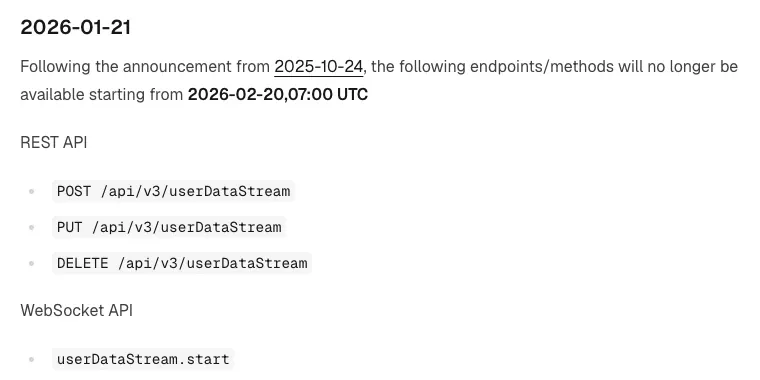
Since 07:00 UTC on 2026-02-20 (3:00 pm the same day in UTC+8), updates such as order fills and balance changes on a Binance spot account can no longer be received through a listenKey. The REST endpoints that created, renewed and closed a listenKey, POST, PUT and DELETE /api/v3/userDataStream, and the WebSocket API methods userDataStream.start, userDataStream.ping and userDataStream.stop all stopped being available at that moment. A spot bot that still renews a listenKey on a timer needs that part replaced with a subscription on the WebSocket API.
The new entry point is the WebSocket API at wss://ws-api.binance.com:443/ws-api/v3; if port 443 gives you trouble, 9443 is the alternative. Once connected, there are two subscribe methods: userDataStream.subscribe requires the connection to be logged in with an Ed25519 key first, while userDataStream.subscribe.signature needs no login and accepts a signature from any key type, HMAC, RSA or Ed25519. Everything retired this time is on the spot side; USDⓈ-M futures and margin are connected differently, which section 4 covers.
When did Binance retire the spot listenKey?
More than ten months passed between the deprecation notice and the actual shutdown, and along the way the key-type requirement was relaxed once. These are the relevant entries in the Spot API changelog:
| Changelog date | What it says |
|---|---|
| 2025-04-07 | Receiving the user data stream with a listenKey on wss://stream.binance.com:9443 is deprecated in favour of subscribing on the WebSocket API; at the time, that subscription only worked with an Ed25519 key |
| 2025-04-29 | Notice that, before listenKeys are removed, subscribing to the user data stream on the WebSocket API will be possible with any API key type |
| 2025-08-12 | userDataStream.subscribe.signature is added: no login needed, any key type works, and one connection can subscribe to several accounts at once |
| 2025-10-24 | All documentation for listenKeys used on wss://stream.binance.com is removed, with a reminder to subscribe on the WebSocket API instead |
| 2026-01-21 | Retirement notice; the cut-off time and the list of endpoints are shown below |
To find out whether your own program needs changing, search your code and config for three things: listenKey, /api/v3/userDataStream and userDataStream.start. Any match that belongs to a spot account is the part to replace. If you run a third-party library or a ready-made bot, look through its release notes for an entry about moving the user data stream to a WebSocket API subscription, then decide whether to upgrade.
Spot account updates now come through userDataStream.subscribe or subscribe.signature
Both methods subscribe to the same set of user data stream events. They differ in whether you log in first, which keys they accept and how many accounts one connection can handle:
| Point of comparison | userDataStream.subscribe | userDataStream.subscribe.signature |
|---|---|---|
| Prerequisite | The connection is logged in with session.logon first | No login; any session can call it |
| Key type | Ed25519 only | Any type (HMAC, RSA, Ed25519) |
| Parameters | apiKey | apiKey, timestamp, signature, optional recvWindow (max 60000) |
| Whose updates you get | The one account that logged in | One or more accounts you can sign for |
| When session.logout is called | The subscription closes with it | The subscription is unaffected |
| Request weight | 2 | 2 |
If all you have is a system-generated HMAC key and you'd rather not switch keys for now, the signature method means the fewest changes. If you already use an Ed25519 key and plan to place orders over the same WebSocket connection, log in with session.logon and then call userDataStream.subscribe: after login, signed requests on that connection can leave out apiKey and signature, though they still have to send timestamp. A connection can only be logged in with one key at a time, and calling session.logon again switches it to the new key.
Both methods return a subscriptionId on success. To unsubscribe, call userDataStream.unsubscribe: with no parameters it closes every subscription on the connection, and with a subscriptionId it closes only that one.
One connection can carry up to 1,000 account subscriptions at once
With the signature method you can put several accounts on the same connection, within these limits:
- One account can have only one active subscription on the same connection.
- A single session can hold at most 1,000 active subscriptions at once; going over returns an error. If the accounts trade heavily, don't open too many subscriptions on one connection, or you risk overloading it.
- Over its lifetime, from opening to closing, a session can open at most 65,535 subscriptions; at that point you get an error and need a new connection before subscribing again.
- session.subscriptions lists the subscriptionId of every active subscription in the current session.
- The userDataStream field returned by session.status: null means this WebSocket API doesn't offer user data stream subscriptions, true means there is at least one active subscription, and false means there are none.
For example, say you run the same spot strategy for 3 accounts. You can open a single connection, call userDataStream.subscribe.signature once for each account, get 3 subscriptionIds back and keep them in a subscriptionId-to-account lookup table. Each time an update arrives, look up its subscriptionId to know which account's positions and open orders to update. Calling session.status once at startup and waiting for userDataStream to be true before you start listening makes a failed subscription easier to spot than simply waiting for the first update.
Do futures and margin account updates still use a listenKey?
Don't carry the spot conclusion over directly. In October 2026 the USDⓈ-M futures API docs still offer the listenKey set: POST /fapi/v1/listenKey to create one, PUT to keep it alive and DELETE to close it. The stream closes after 60 minutes unless it is kept alive in the meantime; if the account already has a valid listenKey, POST returns the same one and extends its validity by 60 minutes. A keepalive is meant to be sent roughly every 60 minutes.
For margin accounts, the recommended route is a listen token, which replaces the listenKey user data stream on wss://stream.binance.com:9443. It takes two steps:
- On REST (https://api.binance.com), call POST /sapi/v1/userListenToken to get a token and its expirationTime. The validity parameter is in milliseconds, and both the default and the maximum are 24 hours. For isolated margin, send isIsolated=true, in which case symbol is required; without isIsolated it's cross margin.
- On the WebSocket API, call userDataStream.subscribe.listenToken. Its only parameter is listenToken, and sessions that aren't logged in can use it too. An invalid token returns error code -1209.
To renew, call POST /sapi/v1/userListenToken again before the current subscription expires to get a new token, then call userDataStream.subscribe.listenToken again with it; the subscription extends to the new expirationTime. If you miss the expiry, you receive an eventStreamTerminated event, and nothing more is pushed until you subscribe again with a new token.
| Account | How updates are received | What has to be done on time |
|---|---|---|
| Spot | userDataStream.subscribe or .signature on the WebSocket API | No more listenKey keepalives; reconnect and resubscribe when the connection drops |
| USDⓈ-M futures | POST /fapi/v1/listenKey | Send a PUT keepalive within 60 minutes |
| Margin | POST /sapi/v1/userListenToken + userDataStream.subscribe.listenToken | Get a new token and subscribe again before the 24-hour validity runs out |
Connections drop after 24 hours, so reconnect and resubscribe on serverShutdown
A single WebSocket API connection is only valid for 24 hours and is disconnected when the time is up. While it's open, the server sends a ping frame every 20 seconds and disconnects if no pong arrives within a minute; answer each ping with a pong as soon as you can, carrying back the ping's payload unchanged. The server also accepts unsolicited pongs, but they don't prevent the disconnection.
When the server is about to shut down, it pushes a serverShutdown event, and you should open a new connection as soon as possible after receiving it. The 2026-06-09 changelog removed the fixed 10-minute warning before disconnection from the docs, so don't build a 10-minute countdown into your program; switch as soon as the event arrives.
Both subscribe methods only cover updates on the current connection, so on a new connection the login and the subscriptions have to be done again. The reconnect steps:
- Open a new connection. If you use the subscribe method, call session.logon first.
- Subscribe again, get the new subscriptionId and update your lookup table.
- Close the old connection only after the new connection's subscription is confirmed.
- Query open orders and balances once through the REST or WebSocket API to catch up on what changed while you were disconnected.
Step 4 works the same way as when an order request times out: if an order's status hasn't shown up in the user data stream, query it through the API.
Reconnecting has its own rate limit: 300 connections every 5 minutes, counted per IP. After a failed reconnect, don't retry straight away; wait a little longer each time, the same back-off you would use after an HTTP 429 response. Before switching to an Ed25519 key, you can check how to set permissions and the IP whitelist against our guide to setting up a Binance API key safely.